
Anybody who has used windows is probably familiar with the ListView control. It is used in Windows Explorer; it is even used for the desktop. Heck, the ListView control even has implementations on Linux and Mac, and in the latter case it was there first.
The ListView itself can display in several modes. Normally, it shows things as Icons. But it can also be set to show Small Icons, a List, in some Operating Systems, there is a ‘Tile’ option, or even options like Large,Medium, and other sizes of Icons. My Personal favourite is the details mode.
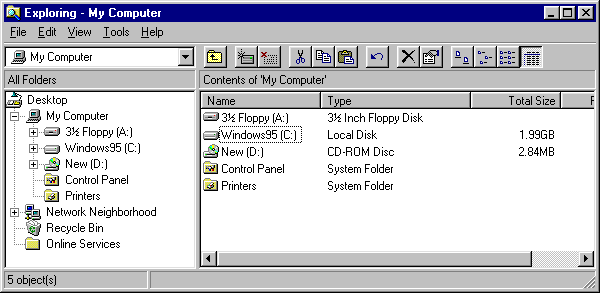
HA! Bet you didn’t expect me to use an image from Windows 95! Expect the unexpected, chaps.
Because I mostly see and use Listviews in Details mode, I also force people who use my software to deal with Details mode. Mostly because the reason I am displaying a ListView is to show some data in a somewhat tabular format and not just give them a few icons to drag around with minimal actual information, but I digress. Anyway, I think a good question at this point might be to look at what different parts this particular ListView has. First, the gray “buttons” at the top, which serve to title each column, are referred to affectionately as ColumnHeaders. Under each ColumnHeader there is data for a given “subitem” of each item. For example, the “Size” entry here is a Subitem for each drive. An interesting feature of columnheaders that is nearly universal is that you can click on one, and it will sort by that column.
Another interesting thing, is that in many programming environments, the ListView control doesn’t actually provide this feature for you, and you have to code it yourself. It is rather frustrating. In particular, Visual Basic 6 allows you to sort, but you can’t really customize what you sort by; it always treats it as text. In one of my VB6 applications, BCSearch (which is available for download from my Downloadspage) I managed to use a Custom control, available from VBAccelerator.com, which exposes additional functionality of the ListView Control on top of that provided in either of the MS provided libraries for use within Visual Basic. One of these features is that it has better support for sorting. I still had to add my own “arrow” to show the sort direction, though.

BCSearch showing results sorted by Size
The VBAccelerator control exposes a number of events and properties for controlling sorting, which I use to properly sort the various subitems, so that various entries like date or size aren’t sorted as text.
Curiously, the .NET Windows Forms ListView control, while having more functionality, still leaves a lot of effort to the programmer for what ideally ought to be a free feature supported by the OS. In fact it IS a free feature supported by the OS. Thankfully, the .NET control does in fact provide a feature for customizing sort functionality, And all you need is a class to implement IComparer. the IComparer will be used to compare the listitems as the Listview sorts. But if you have, say, Date and Time fields and size fields or other fields that can’t just be sorted as text, you are going to need to implement your own special comparer for each. This amounts to quite a bit of glue code; on top of that, you will need to handle the ColumnClick events on the ColumnHeader, change the sort mode, and sort it, and so forth.
To combat this bloating code, I wrote a relatively small class designed to encapsulate sorting. The idea being that you create a instance of this class for each listview, pass in the ListView to it’s constructor, and the class handles all the details. It worked quite well. There was a minor issue that amounted to a gigantic pain in the ass but at the same time made the result a lot better.
|
1 2 3 4 5 6 7 8 9 10 11 12 13 14 15 16 17 18 19 20 21 22 23 24 25 26 27 28 29 30 31 32 33 34 35 36 37 38 39 40 41 42 43 44 45 46 47 48 49 50 51 52 53 54 55 56 57 58 59 60 61 62 63 64 65 66 67 68 69 70 71 72 73 74 75 76 77 78 79 80 81 82 83 84 85 86 87 88 89 90 91 92 93 94 95 96 97 98 99 100 101 102 103 104 105 106 107 108 109 110 111 112 113 114 115 116 117 118 119 120 121 122 123 124 125 126 127 128 129 130 131 132 133 134 135 136 137 138 139 140 141 142 143 144 145 146 147 148 149 150 151 152 153 154 155 156 157 158 159 160 161 162 163 164 165 166 167 |
using System; using System.Collections; using System.Collections.Generic; using System.Diagnostics; using System.Drawing; using System.Linq; using System.Runtime.InteropServices; using System.Text; using System.Windows.Forms; namespace JobClockAdmin { public static class ListViewExtensions { [System.Runtime.InteropServices.StructLayout(LayoutKind.Sequential)] public struct HDITEM { public int mask; public int cxy; [System.Runtime.InteropServices.MarshalAs(UnmanagedType.LPTStr)] public string pszText; public IntPtr hbm; public int cchTextMax; public int fmt; public IntPtr lParam; // _WIN32_IE >= 0x0300 public int iImage; public int iOrder; // _WIN32_IE >= 0x0500 public uint type; public IntPtr pvFilter; // _WIN32_WINNT >= 0x0600 public uint state; [Flags] public enum Mask { Format = 0x4, // HDI_FORMAT }; [Flags] public enum Format { SortDown = 0x200, // HDF_SORTDOWN SortUp = 0x400, // HDF_SORTUP }; }; private const int HDM_FIRST = 0x1200; private const int LVM_FIRST = 0x1000; private const int HDM_GETITEMCOUNT = (HDM_FIRST + 0); private const int HDM_SETITEM = (HDM_FIRST + 4); private const int LVM_GETHEADER = (LVM_FIRST + 31); private const int HDM_GETITEM = (HDM_FIRST + 3); [DllImport("user32.dll", EntryPoint = "SendMessageA")] private static extern IntPtr SendMessage(IntPtr hwnd, int wMsg, IntPtr wParam, IntPtr lParam); [System.Runtime.InteropServices.DllImport("user32.dll", EntryPoint = "SendMessage")] public static extern IntPtr SendMessageHDITEM(IntPtr hWnd, uint Msg, IntPtr wParam, ref HDITEM hdItem); public static void SetSortIcon(this System.Windows.Forms.ListView ListViewControl, int ColumnIndex, System.Windows.Forms.SortOrder Order) { IntPtr ColumnHeader = SendMessage(ListViewControl.Handle, LVM_GETHEADER, IntPtr.Zero, IntPtr.Zero); for (int ColumnNumber = 0; ColumnNumber < = ListViewControl.Columns.Count - 1; ColumnNumber++) { IntPtr ColumnPtr = new IntPtr(ColumnNumber); HDITEM item = new HDITEM(); item.mask = (int)HDITEM.Mask.Format; SendMessageHDITEM(ColumnHeader, HDM_GETITEM, ColumnPtr, ref item); if (!(Order == System.Windows.Forms.SortOrder.None) && ColumnNumber == ColumnIndex) { switch (Order) { case System.Windows.Forms.SortOrder.Ascending: item.fmt &= ~(int)HDITEM.Format.SortDown; item.fmt |= (int)HDITEM.Format.SortUp; break; case System.Windows.Forms.SortOrder.Descending: item.fmt &= ~(int)HDITEM.Format.SortUp; item.fmt |= (int)HDITEM.Format.SortDown; break; } } else { item.fmt &= ~(int)HDITEM.Format.SortDown & ~(int)HDITEM.Format.SortUp; } SendMessageHDITEM(ColumnHeader, HDM_SETITEM, ColumnPtr, ref item); } } } class GenericListViewSorter : IComparer { private System.Windows.Forms.ListView OurListView; //GetCompareValue: given a columnname and a ListViewItem, should return any more specific type. //For example, if Column represents a date value, it would return a DateTime. public delegate Object GetCompareValue(GenericListViewSorter Sorter, String ColumnName, ListViewItem Item); private GetCompareValue CompareValueFunc; private ColumnHeader CurrentSortColumn = null; private SortOrder[] SortOrders = new SortOrder[] { SortOrder.None,SortOrder.Ascending, SortOrder.Descending }; private String[] SortOrderImageKey = new string[] {"CLEAR","ASCENDING","DESCENDING" }; private int CurrSortIndex = 0; private Object GetCompareValue_Default(GenericListViewSorter Sorter, String ColumnName, ListViewItem Item) { //default just returns the String, for now. Later, add special conditions that detect when something is a valid date. Or something... int indexuse = Sorter.OurListView.Columns[ColumnName].Index; return Item.SubItems[indexuse].Text; } public GenericListViewSorter(ListView handleListView,GetCompareValue GetCompareRoutine) { OurListView = handleListView; if (GetCompareRoutine != null) CompareValueFunc = GetCompareRoutine; else CompareValueFunc = GetCompareValue_Default; handleListView.ColumnClick += new ColumnClickEventHandler(handleListView_ColumnClick); } void handleListView_ColumnClick(object sender, ColumnClickEventArgs e) { //throw new NotImplementedException(); //First thing is first: is this the same column that was clicked before? ColumnHeader clickedcolumn = OurListView.Columns[e.Column]; if (CurrentSortColumn == null) { CurrentSortColumn = clickedcolumn; } if (CurrentSortColumn != clickedcolumn) { //if not, set the current sort Index to 0... // CurrentSortColumn.ImageKey = "CLEAR"; //don't want it to keep the image... CurrentSortColumn = clickedcolumn; } else { //if it is the same, increment it and take the modulus... CurrSortIndex = (CurrSortIndex + 1) % (SortOrders.Length); Debug.Print("CurrSortIndex:" + CurrSortIndex); } //CurrentSortColumn.ImageKey = SortOrderImageKey[CurrSortIndex]; OurListView.Sorting = SortOrders[CurrSortIndex]; OurListView.SetSortIcon(CurrentSortColumn.Index, OurListView.Sorting); if (CurrSortIndex == 0) { OurListView.ListViewItemSorter = null; } else { OurListView.ListViewItemSorter = this; } OurListView.Sort(); } #region IComparer Members public int Compare(object x, object y) { ListViewItem a = (ListViewItem)x; ListViewItem b = (ListViewItem)y; String columnnameuse = CurrentSortColumn.Name; Object checkA = CompareValueFunc(this, columnnameuse, a); Object checkB = CompareValueFunc(this, columnnameuse, b); if((checkA is IComparable) && (checkB is IComparable)) { if(OurListView.Sorting==SortOrder.Ascending) return ((IComparable)checkA).CompareTo(checkB); else { return ((IComparable)checkB).CompareTo(checkA); } } return 0; } #endregion } } |
As you can see, it it relatively small (overall). the API code at the top might be a bit confusing, but it is a result of what can only be described as an oversight on Microsoft’s part; see, originally, I was changing the sort arrow header by simply changing the columnheader image. This worked, sorta of, but there was no way to remove the image and it had this weird effect where it would basically move the text and make it aligned sorta weird. Turns out that the way the ListView would “normally” show sort order icons was a built in feature of the Listview since Common Controls 6 (XP). After some SDK digging I was able to use the Platform Invoke feature of C# to call all the appropriate API functions and “force” the Listview to show the sort order in the header appropriately.
The class also exposes a custom delegate which can be implemented and passed in to the constructor, which will allow for “custom” sorts. This is useful if columns contain data like dates, or numbers that you don’t want to be sorted using the normal “text” comparison.
All in all, It’s a class I’ve added to my “toolbox”, alongside my INIFile class for accessing INI Files. did I write about that one? I forget.
Have something to say about this post? Comment!
2 thoughts on “The Windows ListView: Sorting”
How do you implement this? Can you provide and example?
Usage consists of setting a Member Variable; say during Form Load:
eg.
//Member variableprivate GenericListViewSorter MainListSorter = null;
//in Form_Load, or wherever is appropriate for setting up the List View
_MainListSorter = new GenericListViewSorter(lvwItems);